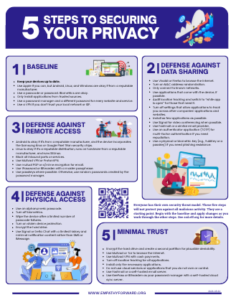
Everyone has their own security threat model. These five steps will not protect you against all malicious activity. They are a starting point. Begin with the baseline and apply changes as you work through the other steps. See ssd.eff.org for more details.
1 Baseline
- Keep your devices up to date.
- Use Apple if you can, but Android, Linux, and Windows are okay if from a reputable manufacturer.
- Use a passcode or password. Biometrics are okay.
- Only install applications from trusted sources.
- Use a password manager and a different password for every website and service.
- Use a VPN if you don’t trust your local network or ISP.
2 Defense Against Data Sharing
- Use Vivaldi or Firefox to browse the internet.
- Turn on MAC address randomization.
- Only connect to known networks.
- Use applications that come with the device, if possible.
- Audit location tracking and switch to “while app is open” for those that need it.
- Turn off settings that allow applications to track you across other companies’ applications and websites.
- Install as few applications as possible.
- Use Fastmail or a similar email provider.
- Use an authenticator application (TOTP) for mult-factor authentication if you need repudiation.
- Use a physical or biometric key (e.g., YubiKey or a passkey) if you need phishing resistance.
3 Defense Against Remote Access
- Android is okay if it’s from a reputable manufacturer, and the device incorporates the Samsung Knox or Google Pixel Titan security chips.
- Linux is okay if it’s a reputable distribution, runs on hardware from a reputable manufacturer, and runs SELinux.
- Block all inbound ports or services.
- Use Mullvad VPN or ProtonVPN.
- Use mutual PGP or s/mime encryption for email.
- Use 1Password or Bitwarden with a master passphrase.
- Use passkeys where possible. Otherwise, use random passwords created by your password manager.
4 Defense Against Physical Access
- Use an alphanumeric passcode.
- Turn off biometrics.
- Wipe the device after a limited number of passcode failures.
- Turn on stolen device protection.
- Encrypt the hard drive.
- Use Signal or Delta Chat with a limited history and minimal notification content rather than SMS or iMessage.
5 Minimal Trust
- Encrypt the hard drive and create a second partition for plausible deniability.
- Use Mullvad or Tor to browse the Internet.
- Use Mullvad VPN with cash payments.
- Turn off location tracking for all applications.
- Install only the necessary applications.
- Do not use cloud services or applications that you do not own or control.
- Use Fastmail or a self-hosted email server.
- Use Bitwarden as your password manager with a self-hosted cloud sync server.